Overview
Before starting the installation, let's discover how XTM One is built, which services it relies on and how it can be hosted.
Docker deployment of the full XTM suite (OpenCTI - OpenAEV - XTM One)
If you're looking for information about the deployment of the full eXtended Threat Management (XTM) suite using Docker, please refer to this repository and documentation.
Architecture
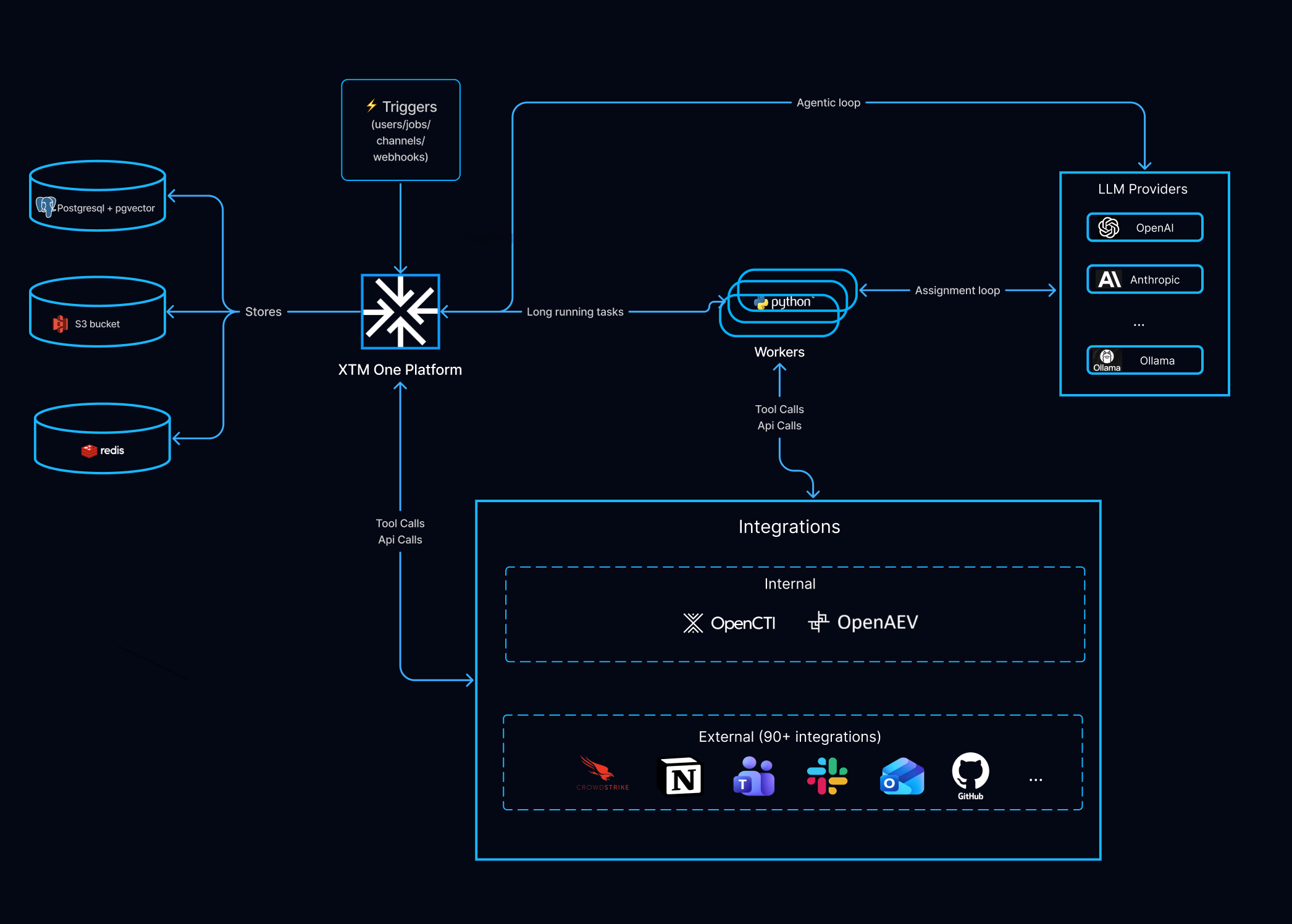
The diagram groups the deployment by role, following the flow from triggers (inbound) through the platform and workers you run, out to LLM providers and integrations, and down to storage.
Triggers
What starts work: a chat message, an incoming channel message (Slack, Teams, WhatsApp, Telegram, Discord, Google Chat, web), a webhook, a scheduled tick, or an integration event. All arrive at the platform.
XTM One platform — xtmone/platform
The service you run: API + web UI (port 4000), chat (WebSocket/SSE), the LLM proxy (/v1), the MCP endpoints (/mcp/*), and webhooks. Also runs the cron scheduler and event poller, applies migrations on startup, and runs the agentic loop for chat. Scales vertically first — add CPU/RAM and raise WEB_WORKERS; more platform replicas are supported too, for availability or load (see Running more than one platform replica).
Workers — xtmone/worker
Run all background jobs — assignment runs, knowledge-base embedding (via SAQ), evaluations, sub-agent tasks — plus the orchestration reconciler that drives the durable run state machine. They run the agentic loop for assignments; no interactive chat. Scale horizontally — add replicas when jobs queue (WORKER_CONCURRENCY, default 20).
LLM providers
External model endpoints reached at runtime (OpenAI, Anthropic, … or local Ollama). Configured in Settings; LLM calls are outbound only. 10 provider types are supported.
Integrations
The outbound tools the agent acts through: integrations (Internal XTM Suite — OpenCTI, OpenAEV — plus 90+ External third-party), MCP servers, and custom tools. Integrations are two-way — the native Suite platforms call back in via their embedded "Ask AI" (see XTM Suite integration).
Storage
- PostgreSQL + pgvector — system of record: relational data, run state (
orchestration_executions), and vector embeddings (RAG + memory). Back it up. - Redis — coordination, not durable: SAQ queue, pub/sub, cache, transient memory. Evicts LRU when full; durable state lives in PostgreSQL.
- Object storage (Silo / S3) — files: knowledge-base documents, attachments, generated files. Any S3-compatible service.
All three are sized to your data and set via DATABASE_URL, REDIS_URL, and S3_* — bundled container or managed equivalent (RDS/Aurora, managed Redis, S3).
The Installation page turns this into a deployment: Infrastructure requirements gives the concrete CPU/RAM figures and the database connection-budget math, and the Scaling model covers adding worker and platform replicas.
Deployment models
XTM One can be deployed in two ways: Filigran SaaS (Filigran-hosted) and Self-Hosted (you run it).
| Filigran SaaS | Self-Hosted | |
|---|---|---|
| Hosting | Filigran-hosted cloud instance | Your infrastructure — on-premises or your own cloud |
| Maintenance | Filigran | Your team |
| Upgrades | Handled by Filigran | Manual |
| Network | Outbound HTTPS only | Your choice — on-premises, private cloud, internet-facing, or fully air-gapped |
| Best for | Fastest start, no infrastructure to run | Full control, on-premises or data-residency requirements, air-gapped environments |
Filigran SaaS
Filigran hosts and operates XTM One for you as a fully managed cloud private instance. You access the platform through a Filigran-provided URL.
What you need
- A Filigran subscription
- A supported web browser (Chrome, Firefox, Edge)
- Outbound HTTPS access (port 443) to the platform URL provided during onboarding
- Outbound HTTPS to your identity provider (if SSO is configured)
- Outbound HTTPS to any external service your agents connect to (AI providers, messaging platforms, etc.)
Onboarding
- Filigran provisions your tenant and sends you a URL and initial admin credentials.
- Sign in, then go to
Settingsto configure AI providers, SSO, and integrations.
Access provisioning
Users can access the platform through:
- Admin invitation — admins create user accounts from
Settings→Users. - SSO auto-provisioning — when OIDC or SAML is configured, users are created automatically on first login. SAML supports automatic group mapping from IdP group claims.
- Self-registration — if enabled by the admin, users can register with a valid email domain.
Your responsibilities
- User accounts, SSO, and access control
- AI provider configuration (API keys configured from the Settings UI)
- Agent, integration, and knowledge base setup
What Filigran manages
- Infrastructure provisioning and monitoring
- Platform upgrades and patches
- Database backups and disaster recovery
- Availability, performance, and scaling
Infrastructure-level requests — custom domains, network peering or VPN access instead of the public internet, and sizing or capacity changes — go through Filigran. Share your sizing and capacity needs with Filigran so the instance is provisioned accordingly.
Limitations
- No access to the underlying infrastructure, database, or containers
- No control over environment variables or performance tuning (worker count, pool sizes)
- Upgrade timing is controlled by Filigran
- Custom tool sandbox mode is not configurable
Self-Hosted
You deploy and operate XTM One on your own infrastructure. The Architecture above describes the services you run; the Installation page covers the infrastructure requirements and the step-by-step procedure.
What self-hosting means
When you self-host, you take on responsibilities that Filigran handles in the SaaS model:
| Area | Managed (SaaS) | Self-Hosted |
|---|---|---|
| Upgrades | Automatic or coordinated | You pull images and restart manually |
| Database backups | Managed by Filigran | Your responsibility |
| TLS certificates | Included | You provide certificates and a reverse proxy |
| Monitoring and alerting | Included | You set up your own (Langfuse, Prometheus, log aggregation) |
| Scaling | Managed by Filigran | You scale workers and tune connection pools |
| Infrastructure security | Managed by Filigran | You harden the host, network, and containers |
Next step
Continue with the Installation procedure to deploy the platform.